Our Technical Solution for the Baby Monitor
Posted by: sarah on: August 5, 2012
- In: Geek Parents | SUX
- Leave a Comment
Many months ago, when I was pregnant, my husband and I were talking about baby monitors. While looking at the ones already out there, none really jumped out at us. Now, with both of us being geeks, we decided we’d evaluate our options here with the hardware and software available. After figuring out that we had spare hardware laying about, we decided that we had to find a piece of software that could do monitoring.
Software Requirements and Test
Our requirements were simple:
- Allow audio monitoring of the baby (video would be an added plus)
- Desktop & mobile clients needed to be available - for both Android and Windows Phone
That first option was easy - there are plenty of conferencing and video/audio chat programs out there that would meet that requirement. Now the second requirement, that’s where it got tricky. My husband has an Android phone, and I have the Windows Phone. Finding programs with Android clients is simple. Finding programs with Windows Phone clients alone is okay. But finding a client that works on both platforms - that wasn’t as easy.
Thankfully, Skype had a beta client for Windows Phone and already had a client out for Android. We took it for a test spin to see how it would work, and sure enough it worked wonderfully.
Skype Setup
So… how did we set up Skype?
- Create an account for the baby monitor.
- Add ourselves to the baby monitor’s contact list.
- On the baby monitor’s Skype client:
- Click Tools
- Click Options
- Under the Call Settings section:
- Check Allow calls from… people in my Contact list only
- Check Answer incoming calls automatically
- If you want video, then also check Start my video automatically when I am in a call
- Click Save
The other thing we did at this point was muted the sound on the baby monitor’s client so that we wouldn’t have to mute ourselves every time and so that the baby wouldn’t hear us when we connected.
Adventures at Cleveland GiveCamp 2012
Posted by: sarah on: July 23, 2012
This past weekend, I had the fun experience of participating in Cleveland GiveCamp. This was my 5th GiveCamp overall, 3rd in Cleveland, and 2nd as a project manager.
Why I Love Cleveland GiveCamp
Growing up, my parents raised me to put my skills to work and help others when I can. Besides being able to put my developer skills to use, I can also take advantage of my abilities to translate tech into plain English by taking on a project manager role, which I enjoy a lot more than developing because it has me dealing with the client more. While I like writing code, I get more satisfaction in knowing that the big picture is taken care of and that the client’s needs are getting met. What I love most about Cleveland GiveCamp is that it’s here in Cleveland, my hometown. It takes place both on a boat and in an airport - no other GiveCamp can claim that. (Special thanks to LeanDog and Burke Lakefront Airport for giving us space to work.) The last thing I truly love seeing is that the non-profits here are extremely appreciative of the work and some come back and pay it forward.
Paying It Forward
I have to admit it - I love when previous years’ non-profit representatives come back and volunteer at GiveCamp. In 2011, we had Sherrie Zagorc from Kiddie City (my project from 2010) helping with the food. This year, we had three different non-profits from last year come help this year - Tim Smith of Community Greenhouse Partners and Kathy & Rich Wickens of Euclid Beach Park Now and Cleveland’s Euclid Beach Carousel Society. For non-profit reps to come back and help out - this is a great thing! It’s good to see that they not only appreciate the work that was done for them while at the GiveCamp but they remember what was done and come out a year later to again show their appreciation. I love that they come back like that!
My Team - New Avenues to Independence/Buckeye Industries
I had the privilege of being the project manager for 1 project this year - Buckeye Industries, a business enterprise of New Avenues to Independence, Inc. They needed a website and were on a Microsoft-based host.
After getting our team together on Friday, we talked about what was out there. I had recommended that the team get WebMatrix to see what options are out there. We originally were considering either mojoPortal or Orchard, as that’s what a couple of us on the team were familiar with. However, since we needed to set up a storefront and wanted something easy to work with, we ended up using DotNetNuke with the NBStore module. We also used the helferlein_Form extension for creating contact forms. I’ll update this post with our final site once DNS propagates. Special thanks to Joe Brinkman for getting us set up with Applied Innovations hosting. Here’s our team:

Etsuko Dunham, Ryan Marinoff, Karen Knavel (our non-profit contact), me, Matt Lucas, and Toby MacKenzie
This team worked really hard and put together an amazing site over the weekend! I’m proud to have worked with such a talented team!
The Recap Video
Once again, my awesome husband Kevin volunteered at GiveCamp and took pictures. You can see most of his pictures on the Cleveland GiveCamp Facebook page. He also created another recap video. Check it out:
If the video doesn’t appear above, check it out on YouTube.
Conclusion
I had a wonderful time at GiveCamp this weekend - working with a talented team and helping such a wonderful non-profit. While it’s an exhausting weekend, it was also quite enjoyable! I look forward to Cleveland GiveCamp 2013!
The (Unnecessary) Education Requirement in Software Development
Posted by: sarah on: July 8, 2012
Last weekend, I was at a gathering with a bunch of my friends when the topic of needing a degree came up. This topic is one that really gets me thinking.
For the record, I do have a degree in a computer-related topic and happen to be the odd one in my group of friends. I have a Bachelor of Science in Computer Science & Engineering Technology from the University of Toledo.
Do you need a degree in a computer-related topic to be a successful software developer?
Honestly, no. Some of my great developer friends have different backgrounds. There are those with theater, music, or other arts degrees. Some have science degrees - chemistry, biology… those kinds of sciences. Some have degrees along the lines of journalism, English, or psychology. And yes, some have non-computer engineering degrees - such as chemical engineering and mechanical engineering.
Each of these degrees, while not computer-focused, have different elements of their expertises that in reality could be applied to computer-related stuff, even if we never pictured it. With a psychology background, you may be able to understand your end users a bit better and use that to develop better user experiences. With the engineering degrees, there’s the engineering element of taking things apart and putting them back together - writing a program is pretty much taking a broken problem a part and putting it back together. With journalism or English backgrounds, you may find those handy when writing documentation and error messages.
Do you really need a degree to be a successful software developer?
In my opinion, I don’t believe you need to have a degree - or even certifications - to be a successful software developer. I know many high school students who are mentored by people in the industry who can write code much better than some college-educated folks. College degrees and certifications - to me - show that you can set a goal of completing a program and actually earning that piece of paper. Unfortunately, many employers are looking for degrees and certifications because they see value in them. However, the smart employers know that if a candidate shows great potential for success - be it through code challenges, discussions of a person’s side jobs, or even someone’s hobby - then their education background really doesn’t make a difference.
So what do you think it takes to be a successful software developer?
If you treat your software development job/side job/hobby as a craft, that’s a great sign that you’re on the road to success. Accepting that you aren’t the only developer out there trying to be successful and learning from other developers who’ve achieved the success you’re looking for are great steps as well. To me, one of the key things you should have in order to be a successful software developer is an understanding not just of the front end, back end, or middle tier but the big picture - if you can explain the front end and why the user experience is the way it is as well as understand how it talks to the back end via a middle tier, then you’re doing something right.
What do you suggest employers look for then if not for a degree in a computer related topic?
The things I tell my manager friends to keep an eye out for include:
- Past jobs experience
- Hobby or side jobs experience
- Code samples
- Portfolio of work/well done resume
If you see something in those and are still uncertain of the candidate’s software development skills’ levels, then try a code challenge and have potential teammates or managers review the code challenge.
My call to employers is this - understand that while someone has a piece of paper saying they’re good working with a technology, it doesn’t mean that the other candidate without that piece of paper is any less of a candidate.
The 9 Month Get-ChildItem Returns
Posted by: sarah on: April 10, 2012
I am pleased to announce the arrival of my ChildItem son! Logan Po Liu Dutkiewicz was born on Thursday, April 5th at 11:01am. He was 6lb 15oz and 20″ long.

I hope to be blogging in the upcoming months about the inspiration he’s given me to create a few apps.
Video Games Retro Flashback
Posted by: sarah on: March 30, 2012
Yesterday, on Twitter, I mentioned that my baby brother was complaining about Wiz Khalifa using a Chrono Trigger song as his background for “Never Been (Part 2)”. Then, someone asked what Chrono Trigger was, and that inspired this post. These are some of my favorite video games from my past.
Chrono Trigger (SNES)

How many times did my brothers & sister ask me to save my game so that they could take their turns with the Super Nintendo? I definitely lost count, as I spent many hours playing as Chrono and friends, travelling through time to meet various characters in the timeline of present, past, and future, solving their problems and defeating the evil Lavos at the end. The game itself has over 13 different endings. The soundtrack is great, one I enjoy listening to even to this day. At the end of the day, Squaresoft put out a great RPG, which took up plenty of my time when I was younger. You can read more about Chrono Trigger on Wikipedia.
Dragon Warrior IV (NES)

Before Chrono Trigger, Dragon Warrior IV was my RPG of choice. Walking between towns, defeating slimes, Ragnar had to save the kingdom of Burland. This was a 5 chapter RPG, part of the Dragon Quest series.
Burger Time (Intellivision)
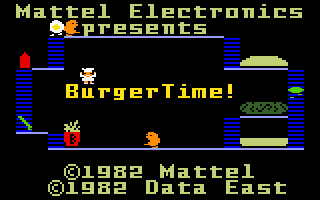
This was probably my first video game addiction. Yes, I know I was only 2 years old at that copyright date. However, my dad got me into console gaming at a very young age. He taught me other games on Intellivision, but BurgerTime! was my favorite hands down. Apparently, I liked making hamburgers while avoiding evil eggs, sausages, and pickles!
Super Mario Bros. (NES)

When I was old enough to play console games without Dad’s help, I fell for the Super Mario Brothers series. While I didn’t like Super Mario 2 (as it didn’t seem to follow the original Super Mario), I did enjoy Super Mario 3 and a bunch of other Mario games while I could. From NES to SNES to N64, I enjoyed a variety of Mario games. I loved playing Mario and trying to rescue Princess Toadstool from Bowser (King of the Koopas), defeating Goombas, Koopa Troopas, and various baddies along the way.
My love for Mario Brothers games still sits with me today. When I found out I was pregnant, I knew I wanted to do a Super Mario Brothers themed nursery. And boy was I thrilled when my husband agreed to it! Below is a sneak peek of some of the Marios in the nursery:

Conclusion
These are a tiny glimpse of the games I used to play. Mind you, RPGs and puzzles are my favorites, but I also played other games as well, especially sports games like Double Dribble, Arch Rivals, Blades of Steel, and Tecmo Bowl. I’ve definitely been a gamer of some sort for most of my life, feeding into my competitive nature. Don’t be surprised if a random video game reference makes an appearance; you never know which game I’ll reference next!
Google+ Pages SUX
Posted by: sarah on: March 30, 2012
- In: SUX
- Leave a Comment
As some of you know, I’m one of the many people behind the various Stir Trek social media accounts. Recently, I was asked to set up a Google+ Page for the event, and I figured… “I’ve set up Pages on Facebook before. How painful could it be with Google+?”
Creating a Google+ Page
After seeing the Google+ Pages section off to the bottom right, I clicked that “Create a Google+ page” link. Choosing a category was difficult… was I creating a page for the Stir Trek brand? The Stir Trek organization? When in doubt, go with “Other”.
After creating the page, I needed to customize the public profile. This is where things got tricky. If you haven’t seen it, the Stir Trek logo is rectangular:

However, Google+ wants a square. Google+ – It’s no longer hip to be square. I really wanted to capture both the name and the Avengers “A” (as this year’s movie is The Avengers). I ended up settling with just the “A”.
All My Life’s a Circle
All these geometric shapes but not a rectangle! My next idea was to set up circles for the organizers and this year’s speakers. So I went about creating circles much like I did for my personal Google+ account. With the circles created, I was ready to add people to them.

Really? Hmm… I had tried adding organizers first but nothing worked. I started following the Stir Trek page on my personal account and then tried adding myself to the Organizers circle. That worked. But adding anyone who hasn’t added me didn’t work. Time to invite others to follow the Stir Trek page so that I can come back here and add them to my circles. Well so much for getting people in their circles before telling people about the page.
A Picture’s Worth 1000 Words
The one thing that seemed quite intuitive and easy to work with was the Photos section of the Page. I was able to create albums for past Stir Trek events and upload pictures without any problems. So if you want to see things such as the theater posters that our sponsors had designed for last year’s event or even the picture of transporting 50 dozen Krispy Kreme donuts, you can check them out in the Stir Trek Google+ Page’s Photos gallery.
A Mostly Frustrating User Experience = Unhappy User
These experiences are just some of the headaches I’ve had with Google+. It probably doesn’t help that I really haven’t adopted the Google+ platform personally – while people claimed that it would replace Facebook, I’m finding Facebook slightly less painful to use. However, because we have it set up, I will periodically post updates to the Stir Trek Google+ page and hope that my Google+ experience turns more positive.
Microsoft Billing and Account Management SUX
Posted by: sarah on: March 29, 2012
- In: SUX
- Leave a Comment
Recently, I wanted to manage my billing options, as I had an invalid credit card tied to my Zune and XBOX Live account. Unfortunately, I had the experience of meeting the Microsoft Billing and Account Management site. This is unfortunate, as it is a site with horrible, HORRIBLE user experiences.
Select from Account IDs
Yes, somebody didn’t get the memo that exposing accounts as account IDs really is a bad user experience. Let’s see what I have…
- Acct ID# 00000-00000-00020-12345 (Personal)
- Acct ID# 00000-00000-02300-12345 (Personal)
- Acct ID# 00000-00000-02412-12345 (Personal)
- Acct ID# 00000-00000-02460-12345 (Personal)
- Acct ID# 00000-00000-00302-12345 (Business)
Now those aren’t my real account numbers, but these are the options that I’m given. I have no idea what any of these account IDs mean. What’s better… in their respective applications, I don’t see these IDs. So why are you showing them to me as an option? Why couldn’t I get options that look more like the ones below?
- Hotmail Plus (Personal)
- XBOX Live (Personal)
- TBD TBD (Personal)
- Platform Services (Personal)
- marketplaceformobile.somerandomstring.US (Business)
I have no idea what some of these are even for - especially if there’s no service listing for that account. And TBD TBD… no idea what that even is let alone why it appears there. Some of these are even cancelled services, so why would I care to manage their Billing if I don’t have them anymore? (Edited note: Talking with my husband, we think this might be a migration of multiple billing systems into one, which could only lead down an ugly path.)
Now one of my accounts looks like it manages my XBOX Live, Zune Pass, and App Hub accounts. So maybe coming up with friendly names for the accounts is a bit harder for their devs… how about letting the end user create friendly names for those accounts rather than showing them Acct ID# 00000-00000-00020-12345?
Disconnect in Payment Data
I went through the process of removing the invalid credit card from my Zune and XBOX Live account. Looking at this in the Billing portal though, I see that this card has been marked as Removed on my cancelled MSN Hotmail Plus account. If I switch to my XBOX Live account, I see that same credit card listed, without being marked as Removed. Really? Mind you, under both accounts, it shows as Xbox Live (Visa: xxxxxxxxxxxx0000) - same exact name. Why wouldn’t show as Removed on the XBOX Live account?
400 Clicks Later
As I mentioned on Twitter today, I was having other issues with my Zune account where credits weren’t showing. Thankfully, @ZuneSupport and the Zune support chat team were able to find a solution that works for my needs. However, I had Tweeted that I had hoped I wouldn’t get sent to the Microsoft Billing site as it was a headache user experience. Leave it to one of my friends to point out that there’s the joys of clicking through a lot of screens to get the data you need. Boy was she right! Even the context-driven FAQs on the right of each page… click, click, click… ah there’s what I need… maybe.
Conclusion
I hope that one day Microsoft will invest in a great user experience team that can go through their websites and find these problems before we do. At the moment, there are a lot of painful user experiences on their sites that I use, and the more I have to use these sites, the more I’m tempted to look at alternative solution providers or weigh the cost of abandoning my current services just to get away from these bad experiences. Painful user experiences are what drives users to competitors who get the user experience right. Please, Microsoft, save us from the painfulness known as your billing site by working with UX experts on making it easier to deal with.
The Plight of Women in Tech Lately
Posted by: sarah on: March 21, 2012
A couple articles/incidents got me thinking, and I wanted to get my thoughts out there.
Boston API Jam - a Hackathon for “Brogrammers”
The Boston API Jam, organized by Sqoot, took the whole “brogramming” idea a little too far. The idea of female event staff getting beers for these so-called “brogrammers”… just an awful thing. BostInno posted a great article on the whole incident: Boston API Jam Publishes Event Invite with Sexist Language, Enrages Community, Sponsors Quick to Pull Out. It was great to read that even the Boston dev community did not approve of these guys and their actions.
The part that gets me is this part from their so-called “official apology” (as quoted on BostInno):
While we thought this was a fun, harmless comment poking fun at the fact that hack-a-thons are typically male-dominated, others were offended.
It’s clods like these that remind us why the WiT movement exists. We already know that it’s a male-dominated field going into it; we don’t need immature, sexist guys to make that point.
And these guys… they’re learning the lessons the hard way. They have issued an official apology on their blog.
Me personally… if I were in the Boston community, I’d be one of the ones speaking up against the Hackathon after all the crap they pulled. But that’s just me. Sexism - and any other discrimination for that matter - in the field is one thing that I won’t stand for.
Why I Stopped Telling Young Girls to Go Into Engineering
Reading this article, it got me thinking a lot. I don’t regret going into engineering - everything makes more sense to me now. I was born with an engineer’s mentality but really couldn’t understand how I fit in until college. Being raised the way I was, I learned how to be successful from my parents, and their lessons have taught me to succeed despite random “no” and “you can’t” messages. There’s a reason why some of my close friends in the industry challenge me with “no” and “you can’t do that” lines - they know that I see them as challenges to surpass. That glass ceiling people mutter about - it doesn’t exist in my world. The boys’ club - I kicked down their doors a long time ago and have been able to play with the boys because they know that I’m serious about what I do and am fair competition.
Yes, I was in the minority in my Computer Science and Engineering Technology program. But I didn’t stand out because of my gender - I stood out because I was active in the student community and played nicely with others. Even to this day, I’m used to being the token female dev or even the token female architect, but the reason why I stand out isn’t because of my token gender status - it’s more because I’m not afraid to speak my mind and happen to know my field. I’ve been watching development on various platforms for over a decade, and my observations of the trends as well as observing where things are going are what keep me ahead of the curve. I am me, and with my knowledge, experience, curiosity, and rest of my personality… I stand out. I’m used to that.
So looking at the “Why I Stopped Telling You Girls to Go Into Engineering” article… it also made me sad. I can only hope that when women who want to go into engineering find that article, they realize that it is one woman’s experience. Here are my thoughts on some of the points she made.
Finding an All Male Environment Entirely Focused on the Technology
I have to admit it… I typically prefer working in a mostly male environment. The cattiness and office drama between women versus that between men are so different, and I’d rather deal with that of men. But that’s just my personal stance. This doesn’t mean that I don’t work with female developers or that I don’t play nicely with them - some of my friends are female devs as well. But they’re like me - can’t be bothered with cattiness or drama.
Instant Gossip in the Office
Gossip exists in most workplaces; this isn’t exclusive to engineering. She mentioned that there are awkward social situations where working closely with a guy leads to instant gossip. As someone who’s been subjected to this (both in my past and yes, even currently), I understand why this would get her down. Honestly, though, when those involved acknowledge that the gossip is there but far from the truth, you learn to deal with the gossip. You learn to see it as people making up stories because they can’t fathom the reality. And eventually, you learn to shrug it off and not let the gossip bother you.
Heated Arguments
This happens no matter who’s working in the environment. Heated arguments are bound to happen, no matter the topic or industry. When an argument gets heated, step away. Arm yourself with the facts, and don’t get judgmental in the argument, as that puts people on the defensive side, making them more argumentative.
Quota Filling Conferences
This point drives me up a wall. If I know that a conference is bringing me on board for my gender rather than for what I have to share knowledge-wise, I’m going to reject that idea. At the same time, having been on various conference boards, I don’t go out of my way to seek out female speakers. For me, it’s never about the gender or race or creed of the speaker - it’s all about the content. On one of my recent conferences, I saw the lineup and an organizer pointed out that there’re now female speakers. All I could do was *shrug* - that is not a selling point for me, nor should it be a selling point for others. I honestly wouldn’t notice if a conference lineup was all male or all female unless someone pointed it out to me. For me, I look specifically at the topics at hand and especially if they interest me.
Lack of Diversity of Thought
She mentions a lack of diversity of thought but also mentions that she doesn’t like to go to tech only conferences and doesn’t seem to like talking with others at conferences. Then she goes forward to say that she’s lonely. In this case, it sounds like she needs to get out more to realize that there’s a ton of diversity of thought in our development communities - regardless of the platform or language. People in our field have random backgrounds - from music to law to psycholoy to journalism to engineering. We all have different experiences in our careers, which have impacted the way we think. There truly is a diversity of thought… if you actually go o conferences and talk with other people in the industry.
Conclusion
These are just my thoughts on these articles. I’m sure others have theirs as well. Got something to add? Leave me a comment here, as I’m curious to see what others have to say! And if you’ve blogged about it, leave me a link to your blog to check out your post!
Happy International PowerShell User Group Day!
Posted by: sarah on: March 19, 2012
Today, techies throughout the world are celebrating the awesomeness of PowerShell with International PowerShell User Group Day. Some people are quick to dismiss it as an IT admin tool, but there are other people besides sysadmins who use PowerShell. I can think of a SharePoint guy, a few SQL Server guys, and yes, even developers, who have embraced the power of PowerShell.
PowerShell Community Groups
There are user groups throughout the world to celebrate discoveries and share scripts done in PowerShell. Yes, I did say “throughout the world”. Let’s take a look at the list at PowerShellGroups.org. Besides the US, I see groups in Denmark, Egypt, UK, Norway, India, and Singapore. For those who do not have a user group close, there’s even a Virtual Group!
Sponsors of Today’s Celebration
Today’s celebration of PowerShell user groups has been talked about throughout the PowerShell community. They’ve even gotten some familiar faces in the community to sponsor the day. So let’s thank these companies for helping make today a success:
Special Meetings
There are special meetings today for user groups to tune into presentations by PowerShell MVP/author/columnist Don Jones, Microsoft’s Hey Scripting Guy! Ed Wilson, and many others. Special thanks to Interface Technical Training for providing the Remote Live platform for delivering this talk. The meetings themselves will be broadcast at:
- 1st broadcast – 12:00 PDT (19:00 Zulu)
- 2nd broadcast – 15:00 PDT (22:00 Zulu)
- 3rd broadcast – 18:00 PDT (01:00 Zulu)
To catch these presentations, check out your local PowerShell user group.
Happy International PowerShell User Group Day!
Search
My Book

Buy it now!